

A closure checklist you can copy
| Channel | Closure information to confirm | Completion evidence |
|---|---|---|
| Business Profile | Exact dates and customer-facing hours | Public profile checked |
| Website/contact page | What is unavailable and when replies resume | Mobile notice inspected |
| Booking system | Unavailable appointments cannot be confirmed | Test request checked |
| Telephone | Correct greeting and monitored route | Outside test call |
| Inquiry acknowledgment | Receipt distinguished from a human reply | Test message received |
| Reopening | Normal settings restored | Named owner signs off |
Fill this from the approved operating schedule, not from last year's announcement.
Make the holiday schedule match the customer experience
Holiday hours are a promise about what a customer can expect. For a contractor, that promise is often more complicated than open or closed. The office may be closed while a field team finishes scheduled work. A form may accept requests while nobody is reviewing them. Emergency coverage may exist for certain customers but not for every new inquiry.
The useful question is therefore broader than whether you updated Google. Can a customer understand what is available, how to contact you, and when the business will respond across every important channel?
A consistent holiday-hours plan connects the approved operating schedule with Google Business Profile, the website, phone greeting, booking calendar, and inquiry acknowledgments. It also identifies who handles exceptions and who restores normal messages afterward.
This guide provides an operational process for local contractors and service businesses. It does not assume that your business offers emergency service or that every channel needs a promotional announcement. The aim is clear expectations, accurate availability, and a dependable return to normal operations.
Start early enough to resolve uncertainty with the people doing the work. Marketing cannot accurately communicate coverage that operations has not confirmed.
Define what open means for your business
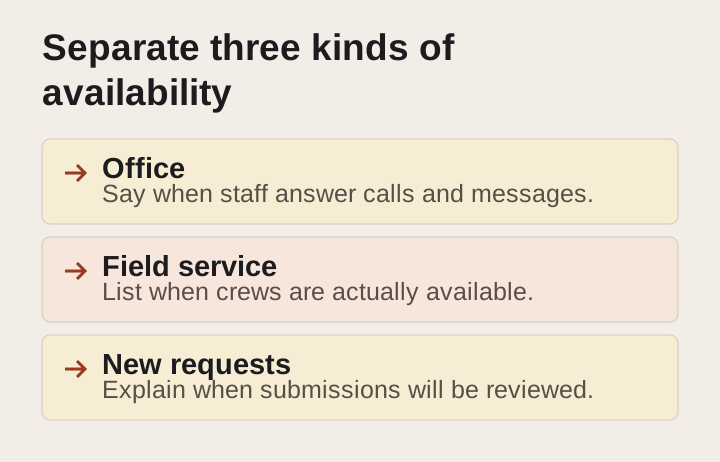
A customer may interpret open as the ability to speak with someone, visit a location, book an assessment, or receive service. Your business may provide only some of those things during a holiday period.
List the customer-facing functions separately. Include office contact, showroom visits if relevant, scheduled field work, new assessments, emergency response if genuinely offered, estimate preparation, and online request collection.
For each function, identify the dates and actual coverage. Do not use the office schedule as a shortcut for every part of the business. A technician working on an existing project does not necessarily mean the office can accept new service requests.
Then decide what the public needs to know. Customers do not need an internal staffing chart. They need a concise explanation of the available service and the next step.
For example, a business might explain that the office is closed on specified dates, online requests remain available, and routine replies resume on the next working day. That is an illustrative structure, not a promise your company should copy without confirming capacity.
If the business offers limited emergency coverage, state the scope and contact route accurately. Avoid language that implies immediate dispatch, unlimited geographic coverage, or guaranteed availability unless those commitments are truly supported.
Build one approved schedule

Create a single internal record for the holiday period. It should include the affected dates, time zone, service availability, contact route, reopening date, responsible person, and any important limits.
Use actual dates rather than phrases such as “next Thursday” in the source record. Relative wording becomes ambiguous when someone copies it into another channel or reads it later.
Confirm the schedule with the people responsible for staffing and delivery. The owner may approve the plan, but the office manager and field supervisor often know details that affect what can be promised.
Record the approval state. Proposed coverage is different from confirmed coverage. If a particular day remains uncertain, do not publish a confident promise and hope the staffing works out.
Assign a person to maintain the record if plans change. Without a clear owner, one channel may be updated from a new conversation while the others retain the previous schedule.
Keep the record concise enough to use. A practical source of truth should make the current answer easy to find, not require someone to interpret a long message thread.
Inventory the channels customers actually use
Start with the channels most likely to influence a customer’s decision. For many contractors, these include Google Business Profile, the website contact page, phone system, inquiry forms, and booking links.
Add other relevant listings, social profiles, customer portals, email signatures, chat tools, and advertising destinations where they display hours or imply availability. Do not assume that updating the homepage changes every landing page.
Look at existing customer communications too. An appointment reminder or project update may contain a routine response promise that becomes inaccurate during the closure.
Build a checklist with the channel, owner, required change, planned activation, planned removal, and verification status. A small table or task list is sufficient if the team maintains it.
Prioritize by customer impact. A wrong phone greeting or open booking slot can cause immediate confusion. An old social post that clearly refers to a past year may be less urgent, though it should still be reviewed if customers are likely to encounter it.
The purpose is not to announce the closure everywhere. It is to make sure the places that answer availability questions give a consistent answer.
Update Google Business Profile using the appropriate setting
Google provides special hours for short-term changes such as holidays, allowing regular hours to remain in place. Its guidance also recommends confirming holiday hours even when they are unchanged. Google special-hours guidance
Use the current interface and documentation when making the change. Platform wording and options can vary. Do not follow an old screenshot if it conflicts with the settings available for your profile.
For a longer or indefinite closure, review Google’s closure guidance rather than treating every situation as a one-day exception. At the time of research, official help pages differed on the exact boundary for a seven-day closure, so businesses at that boundary should check the current in-product guidance or support before choosing. Google closure guidance
After submitting the edit, check the public display. “Saved” in an editing interface and “visible to customers” are different states. Record whether the change is confirmed or still pending.
Do not change the business’s identity or location settings merely to communicate a holiday. Use the appropriate hours or closure tools and provide additional service context on the website where needed.
Remember that Google is one channel. A correct profile cannot resolve a contradictory website banner or a voicemail promising an immediate callback.
Explain the schedule clearly on the website
Put the most important information where a customer is likely to need it. The contact page and booking path are usually essential. A temporary banner can help when the closure materially affects most visitors.
Use a short statement with the dates, affected service, and next step. Avoid a festive graphic that contains all the information as an image while the text remains vague.
Explain whether requests can still be submitted. If they can, state when the team expects to review them using a commitment the business can support. Do not imply that submission secures an appointment or a place in the schedule unless that is how the process works.
Keep the notice readable on a phone. Check that it does not cover the main navigation, form fields, or contact button. A notice intended to reduce confusion should not prevent the customer from using the site.
If the business serves multiple locations with different schedules, make the relevant location clear. A single sitewide notice can be misleading if it applies to only one office or service area.
Plan the removal at the same time as the publication. Record who will remove or update the notice and when. Temporary messages often become stale because everyone remembers to add them and nobody owns the return to normal.
Review every booking route
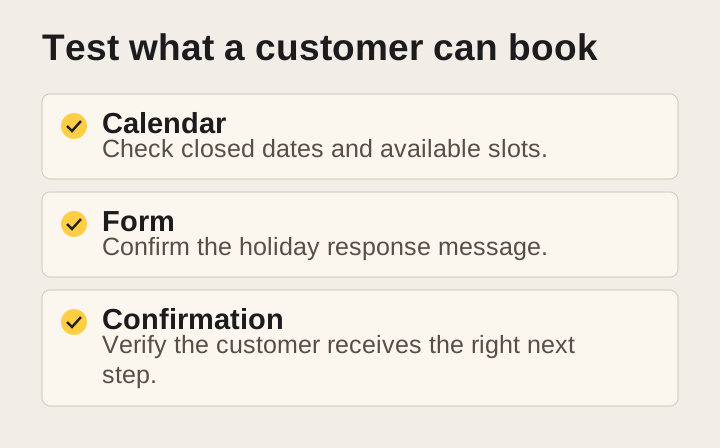
A calendar can contradict the holiday notice even when the written information is correct. Check the availability rules, appointment types, buffers, and staff schedules that control what customers can book.
Test the actual customer view. An internal calendar may show a blocked day while a separate booking tool still offers appointments. Different appointment types may use different rules.
Decide whether customers can request dates during the closure even if appointments will not be confirmed until later. If so, label the action as a request rather than a confirmed booking.
Check automated confirmations and reminders. They should reflect the actual appointment and not contain a generic promise that staff will call on a day when nobody is available.
Review rescheduling and cancellation routes. A customer may need to change an appointment during the closure. Explain the available method and when the team will act on the request.
If an external provider manages the booking system, assign responsibility for the change and verification. Do not assume a website editor can change staff availability or that an office administrator controls the public booking tool.
Make the phone greeting useful
A holiday voicemail greeting should identify the business, explain the relevant closure or limited coverage, and tell the caller what to do next.
Keep the essential information early. A caller should not listen through a long seasonal message to learn that routine service is unavailable.
Ask for only the information the team needs to respond. A name, callback number, and brief description may be sufficient for an initial message. Avoid requesting sensitive details in a general voicemail box.
If there is a separate emergency route, confirm that it works and that the receiving person has agreed to the coverage. Do not publish a personal number or redirect calls without the appropriate authorization.
Test the greeting from an outside phone. Check the main number, any campaign numbers, and relevant extensions. A forwarding rule can bypass the greeting you just updated.
Also test the return to normal. Record the old greeting or approved standard wording so it can be restored accurately. A holiday message left active after reopening can make customers think the business is still unavailable.
Distinguish acknowledgments from responses
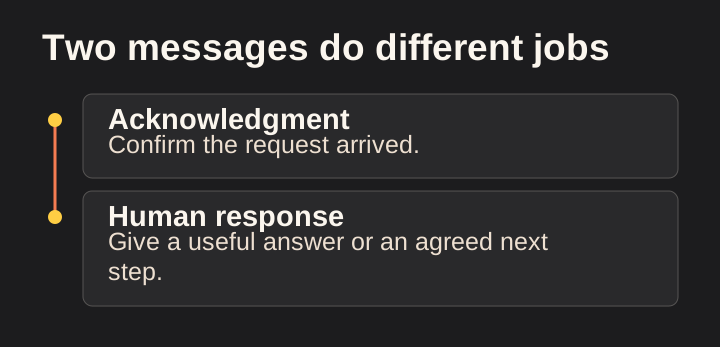
An automatic acknowledgment can tell a customer that the request was received. It should not imply that a person has reviewed the project or confirmed service.
During a closure, revise the acknowledgment to explain the review timing and any limitations. Keep the wording aligned with the website and phone greeting.
Avoid promising a specific response interval unless staffing and workload support it. “We will review routine requests when the office reopens” may be more accurate than a precise deadline the team cannot reliably meet. Use the business’s actual approved commitment.
If the form can fail or the destination is uncertain, test it before relying on the acknowledgment. A success message is not proof that the office received the record.
Consider whether different forms need different messages. A new-project inquiry, a support request from an existing customer, and a general contact message may follow different routes.
Keep the automatic message concise. The purpose is to reduce uncertainty, not to add a marketing sequence to a service notice. Any additional promotional communication should follow the relevant consent and compliance process.
Clarify emergency and urgent-service language
Terms such as emergency, urgent, and available around the clock create strong expectations. Use them only when the business can define and support the service.
Specify what the route is for. Existing-customer support, emergency assessment, and immediate repair are different offerings. A person answering the phone may not be able to dispatch a technician.
Explain material limits in plain language. Coverage may depend on service area, staffing, project type, or safety conditions. Those limits should not be hidden behind a broad promise.
Do not use a holiday notice to provide improvised technical safety advice. For an immediate threat to life or property, direct people to the appropriate emergency service or utility where relevant, without pretending your business replaces those services.
Train the person monitoring the route. They should know what they can confirm, when to escalate, and how to avoid making commitments outside their role.
If the business does not provide emergency service, say so clearly where a customer might otherwise assume it. A form that accepts messages at any hour is not evidence of twenty-four-hour service.
Coordinate with existing customers separately
New prospects need to understand availability. Existing customers may need more specific information about their scheduled work, project contact, deliveries, or access arrangements.
Review active projects before the closure. Identify which customers need a direct update and who is responsible for sending it through an authorized channel.
Keep the message tied to the project. Explain any change to work dates, communication coverage, or decisions needed before the break. Avoid a generic holiday announcement when the customer needs a concrete schedule.
Confirm dependencies with suppliers and other trades where those arrangements are part of your responsibility. A customer-facing promise may depend on a delivery or inspection that follows a different holiday schedule.
Record unresolved issues. If a date is not confirmed, say so and identify the next update. Do not use confident language simply to make the message feel reassuring.
A public banner does not replace a direct update about a material change to an existing commitment. Use the appropriate project process and preserve the agreed record.
Check advertising and landing-page promises
Advertising may continue to send people into the contact path while the office is closed. Decide whether that is appropriate for the service, customer expectation, and staffing plan.
Review language such as call now, same-day service, immediate availability, and book today. A campaign can become misleading during a closure even if it was accurate during normal operations.
Do not assume every campaign should be paused. Some planned services have longer decision cycles, and a clear request path may remain useful. The decision should reflect the actual offer and the business’s ability to handle the resulting inquiries.
If changes are needed, coordinate with the person authorized to manage the campaign. Confirm the scope, timing, and planned restoration. Avoid accidental indefinite pauses or unapproved budget changes.
Check dedicated landing pages. They may have separate forms, phone numbers, and availability statements from the main website. Include them in the holiday checklist.
Document the change for later reporting. A reduction in inquiries during a period when advertising was paused or office coverage changed should not be interpreted without that context.
Assign coverage without creating hidden obligations
A holiday plan should identify who is responsible for each customer-facing function. It should also respect the actual work arrangements and approved availability of those people.
Do not assume the owner will monitor every channel because they sometimes answer messages after hours. A process built on unspoken personal availability is difficult to maintain and easy to misunderstand.
For each monitored route, record the responsible person, backup where available, expected review times, and escalation path. Keep private contact details in the appropriate internal system.
If no one is monitoring a route, the public message should reflect that. It is better to explain when routine replies resume than to create the impression of continuous coverage.
Test notifications before the closure. Confirm that messages reach the intended person and that an absence or disabled device does not silently break the route.
Keep the plan proportional. A small contractor may need only a clear voicemail, tested form, and reopening queue. A larger operation may need more detailed coverage. The goal is reliable ownership, not unnecessary complexity.
Prepare for the reopening workload
Reopening is part of the holiday plan. Requests received during the closure may need triage, callbacks, scheduling, and follow-up.
Create a queue that distinguishes new inquiries from existing-customer matters and genuinely urgent issues. Use the business’s normal criteria rather than promising that every message will be handled in arrival order regardless of context.
Assign responsibility for reviewing duplicates. A customer may have called, emailed, and submitted a form about the same project. Treating those as three unrelated leads can create repeated responses and distorted reporting.
Review the next available appointments before offering dates. A booking calendar that looks open after the holiday may not reflect actual field capacity or delayed projects.
Restore normal messages deliberately. Update the website, phone greeting, acknowledgments, and relevant listings. Confirm that temporary routing and campaign changes have been reversed where appropriate.
Then check a small sample of the customer journey again. The return to normal is complete when the public information and the actual process agree, not merely when the office door is open.
Use a verification checklist, not memory
For each channel, record four states: planned, changed, publicly verified, and restored. Those states make it easier to see what remains.
Take a screenshot or save a brief note where useful. The purpose is not to build a large archive; it is to retain enough evidence that the team can confirm the correct dates and wording were displayed.
Test from the customer’s perspective. Use a phone, a logged-out browser where practical, and the actual public links. Internal previews do not always show the same experience.
Check date formatting and time zones. A message scheduled in one system may activate according to a different zone. Include the local time zone when ambiguity could affect customers.
Review the wording for implied promises. “Back on Monday” can mean the office reopens, not that every waiting inquiry receives a reply that morning. Explain the intended meaning where needed.
Assign the final check to someone other than the person who made the edits when the team can do so. A fresh reader is more likely to notice a contradiction that the editor has mentally corrected.
Handle last-minute changes calmly
Staff illness, weather, supplier issues, or project needs can change the holiday plan. Keep the source schedule current and use the channel checklist to make coordinated updates.
First confirm what changed and who approved the new plan. Avoid publishing a speculative update based on an informal message that has not been checked with operations.
Prioritize customers affected by a specific commitment. A scheduled appointment or active project may need a direct update before the general website notice changes.
Then update the public routes that could create new expectations. If the business can no longer offer limited coverage, remove that promise promptly and explain the available alternative accurately.
Record the change time and remaining pending items. A platform edit may take time to appear, while the website can change immediately. Knowing the difference helps the team answer questions consistently.
After the immediate issue is handled, review why the plan changed and whether the next holiday process needs improvement. The goal is learning, not adding blame to an already difficult day.
Example wording structures to adapt
For a full routine-office closure, the structure is: identify the dates, state that routine office service is closed, explain whether online requests are accepted, and state when review resumes. Replace every detail with the approved facts.
For reduced hours, state the affected dates and exact customer-facing hours. Explain any service that follows a different schedule. Avoid making customers infer that the field team and office share identical availability.
For limited existing-customer support, identify who the route serves and what it covers. Do not present it as a general emergency service if that is not the offer.
For a booking request, distinguish the requested date from a confirmed appointment. Tell the customer how confirmation will arrive and avoid implying that a form submission reserves staff time automatically.
For a reopening notice, confirm that routine operations have resumed and remove outdated closure language. If a backlog affects response, explain the current process without making an unsupported promise about how quickly every request will be resolved.
These are structures rather than ready-to-publish claims. The business must supply the dates, coverage, and commitments before the wording is used.
Measure confusion rather than chasing a vanity metric
The purpose of holiday communication is accurate expectations. Useful review questions concern whether customers found the correct schedule and whether the team handled requests as promised.
Look for repeated calls asking whether the business is open, bookings made into unavailable slots, duplicate inquiries caused by uncertainty, and messages sent to an unmonitored route.
Do not invent a financial loss estimate for every missed call. Review the actual records and identify what is known. Some calls may not have been customer inquiries, and some customers may have used another route successfully.
Record operational lessons. Perhaps the banner was clear but the booking confirmation was outdated. Perhaps the phone greeting worked but a campaign number bypassed it. These are specific improvements for the next closure.
Keep the review brief and assign the corrections. A holiday checklist becomes more valuable when it captures the business’s real experience rather than remaining a generic document.
Keep the calendar reusable without copying old dates
After the holiday period, save the checklist structure and remove assumptions that belong only to that closure. The next holiday may involve different weekdays, staffing, supplier availability, or customer commitments.
When reusing the plan, confirm each date from the current operating schedule. Do not simply change the year in a previous notice. Check the reopening day, the local time zone, and any appointment slots that cross the boundary.
Retain the lessons from the last review. If a tracking number bypassed the greeting, add that number to the test list. If customers misunderstood the word “open,” replace the wording with the specific service available.
Give the reusable checklist an owner. It should be easy for the person preparing the next closure to find the current channel inventory, approved message structures, and verification steps. Reuse the process, then confirm the facts again.
Frequently asked questions
Should our website remain open for inquiries while we are closed?
It can, if the request path works and clearly explains when the team will review messages. Accepting a request is different from providing immediate service. Make that distinction visible before the customer submits.
Should we mark the business open all day because voicemail is available?
Do not equate a recording or form with continuous service. Published hours should reflect the actual customer-facing operation and applicable platform guidance. Explain after-hours request collection separately.
Do we need a holiday post on every social platform?
Not necessarily. Prioritize channels that display availability or receive customer inquiries. A clear profile update or pinned notice may be useful, but repetitive announcements are not a substitute for accurate contact and booking information.
What if the holiday schedule is not final?
Keep it internal as a proposed schedule until the responsible people confirm it. If customers need an answer before then, explain what is known and when the next update will be available.
Confirm one schedule and test the whole path
Before the next closure, choose the person who owns the schedule, confirm the service limits, and review the channels customers use to reach you. Test the phone, form, and booking path rather than relying on an update checklist alone.
If your business needs help keeping its website, listings, inquiries, and follow-up consistent, talk with Loskutech about your business. A clear holiday message works best when the operating process behind it is equally clear.
Explore how Loskutech approaches web design and customer experience.


