A contractor's marketing dashboard can show more conversions while the office sees very little useful work. The difference often comes from what is being counted.
A phone-number click may never become a connected call. A form event may come from a test, a duplicate or a spam message. An existing customer asking about tomorrow's appointment may be valuable, but it is not a newly acquired prospect.
Reliable contractor lead tracking starts with these distinctions. The aim is to understand which marketing activity creates genuine opportunities and where the customer path needs attention. This guide explains how to build a practical measurement plan for calls and forms without confusing technical events with business results.
Begin with the questions you need to answer
Before choosing a tracking tool, list the decisions the business wants to make.
You may need to know which services attract suitable inquiries, whether mobile visitors can contact the office, which campaigns produce out-of-area requests or whether a form stopped delivering messages.
Those questions need different evidence. A website analytics event can help identify a button interaction. A saved inquiry record can confirm that the business received a request. An office disposition can explain whether the project fits.
Do not expect one system to answer every question. Build a small chain of evidence that connects the website, communications and business outcome.
Start with questions such as:
- Are contact paths functioning?
- How many genuine new inquiries arrive?
- Which services and locations do they concern?
- How many meet our practical fit criteria?
- Which sources are associated with useful outcomes?
- Where are we missing information?
- What should we change next?
Keep the list short enough to use in a regular review. A report with dozens of metrics can hide the few decisions that matter.
Define the stages before naming events

Use plain-language definitions that the marketing and office teams both understand.
A contact action is an interaction such as clicking a phone link or pressing a form button. A received inquiry is a call or message that reaches the business. A genuine new inquiry is a real prospective project after removing spam, tests and duplicates.
A qualified inquiry meets the company's service, location, scope and timing criteria sufficiently to justify the next step. A won job meets the business's documented acceptance definition, such as a signed agreement and any required deposit.
These definitions may need adjustment for your operation. The important point is that they remain separate.
For example, a missed call can be a received contact attempt without being a qualified inquiry. A voicemail can contain enough information to identify a potential project, but further discussion may still be needed.
Write the definitions in the reporting document. A metric should not change meaning depending on who presents it.
Also define exclusions. Employee tests, vendor sales calls, job applicants and existing-customer administration should not silently enter the new-lead count.
Create a measurement inventory
List every place a customer can contact the business. Include the homepage, service pages, mobile sticky buttons, footer numbers, estimate forms, scheduling links and advertising contact assets.
For each path, record what the customer does, what the website measures, where the message or call arrives and who owns the next step.
A useful inventory might look like this:
| Contact path | Technical event | Business evidence | Owner |
|---|---|---|---|
| Service-page form | Confirmed submission event | Saved inquiry record | Office coordinator |
| Mobile phone link | Phone-link click | Call log and disposition | Intake team |
| Scheduling link | Booking completion if supported | Confirmed appointment record | Scheduler |
| Advertising call asset | Platform call metric | Connected call and outcome | Campaign and intake owners |
Do not invent an event because it would be convenient. Record what the current implementation actually measures.
Inspect old pages and campaign landing pages as well as the main navigation. A forgotten form may still receive visitors and send inquiries to an inactive address.
The inventory becomes a test plan. When the website changes, you can see which customer paths need to be checked.
Understand what form events tell you
Google Analytics enhanced measurement includes form-start and form-submit events. These describe interactions with forms; they do not establish that the submission was a genuine prospect, successfully processed by every downstream system or suitable for the business. Google Analytics: enhanced measurement
Treat automatic measurement as a starting point to verify. Different form implementations can behave differently, especially embedded tools, custom interfaces and multi-step flows.
Ask the developer what triggers the event. Does it fire when the customer clicks submit, when browser validation passes or when the server confirms successful receipt?
Those distinctions matter. A button-click event can count a failed attempt. A success-page view can be repeated when someone reloads the page. Two tracking implementations can count the same submission twice.
Use a test record to follow the entire path. Submit the form, confirm the saved record, inspect the notification and check the analytics event. Make sure the event fires once for the intended action.
Document what is not measured. If a third-party form does not support reliable completion tracking, say so rather than labeling every outbound click a lead.
Track successful receipt separately from attempted contact
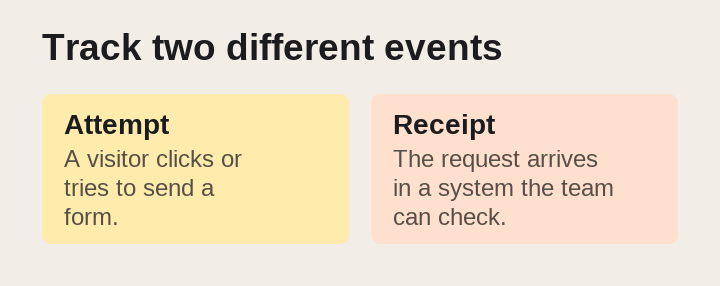
A customer can complete the visible form while an email notification fails. The website can display a success message even though an integration has not created the expected record.
Choose a dependable source of truth for received forms. That might be the form system's submission log or the customer relationship management system, depending on the architecture.
Do not rely only on email as proof that the record exists. Notifications can be filtered, delayed or sent to the wrong person.
Compare received records with analytics periodically. The counts will not always match exactly because consent choices, blockers, time zones and implementation details can affect measurement. The purpose is to detect meaningful discrepancies and understand their causes.
For example, if the form system shows twelve submissions and analytics shows twenty-four, investigate duplicate firing or repeated confirmation views. If analytics shows submissions but the form system has no corresponding records, test whether the event fires before successful processing.
Keep an incident note when something breaks. Record the affected path, the period of uncertainty, what was checked and the fix. Reports covering that period should include the limitation.
Treat phone clicks as intent signals
A phone-link click means someone interacted with a link. It does not prove that a call connected, that the office answered or that the caller had a suitable project.
Label the metric accordingly. “Phone-link clicks” is clearer than “phone leads” when that is all you measure.
Call tracking can add information, but the exact capability depends on the setup. Google Ads documentation describes several methods, including calls from ads, website call tracking and imported call outcomes. Some methods use forwarding numbers or other eligibility requirements, and different metrics should not be treated as equivalent. Google Ads: phone call conversion tracking
Before choosing a tool, decide what you need. Do you need to know that a call occurred, whether it connected, which source it came from or whether it became qualified work?
Avoid buying complexity before the office can consistently record outcomes. A sophisticated call report still needs a reliable way to distinguish a sales inquiry from a supplier calling about a delivery.
Check number ownership and continuity. Understand which numbers belong to the business, which belong to a provider and what happens if the service ends.
Use call outcomes, not duration alone
Call duration can be a useful filter, but it is not a complete qualification rule. A long call may be a vendor pitch, an existing customer discussion or a poor-fit request. A short call may be a genuine prospect arranging a later conversation.
Use a simple disposition process after the call. Categories might include new project, existing customer, supplier, recruitment, spam, wrong number and unknown.
For new projects, record the service, general location and fit status. Keep notes concise and relevant to the next step.
Do not require the person answering to write a lengthy report while calls are arriving. A small number of consistent fields is better than an ambitious system that nobody maintains.
If you use recordings or transcription, obtain appropriate review of consent, notice, access and retention requirements before enabling them. Requirements vary by jurisdiction and circumstances. A marketing tool's availability does not establish permission to record.
You can improve measurement without recording every conversation. A call log and a well-designed disposition field may be enough for the immediate decision.
Review a sample of classifications periodically to make sure different team members use the same definitions.
Separate spam, duplicates and unsuitable projects
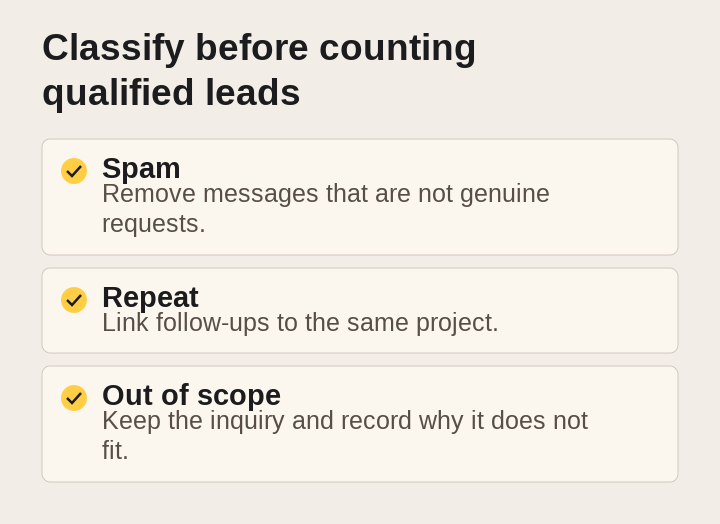
These categories answer different questions and should not be combined.
Spam is not a genuine customer inquiry. Duplicate means another contact about the same opportunity. Unsuitable means a real request that does not fit the business's service, geography, timing or other documented criteria.
If all three are labeled “bad leads,” marketing cannot identify the appropriate fix.
Spam may require form protections or technical investigation. Duplicates may indicate confusing confirmation or poor record matching. Unsuitable projects may require clearer copy, targeting or qualification.
Do not automatically reject a message because it is short, uses imperfect grammar or comes from an unfamiliar number. Use relevant evidence and a reasonable verification process.
Keep an “uncertain” category when the team cannot yet determine whether a request is genuine. An honest unknown is preferable to a forced classification.
Preserve the raw received count and the cleaned business count separately. That allows you to see both the workload arriving at the office and the number of genuine opportunities.
Deduplicate around the project, not only the email address
One customer may call, submit a form and send a follow-up message about the same project. Counting each contact as a new opportunity inflates the pipeline.
Use a consistent method to link related contacts. Contact details, project location, service and timing can help, but the method should respect privacy and avoid collecting unnecessary information.
Do not merge automatically just because two records share a household email or property address. There may be different projects or people. Give a person a way to review uncertain matches.
Define how returning customers are handled. A previous customer requesting a new project may be a genuine new opportunity, but it belongs in a different acquisition category from a first-time customer.
Keep the original contact events when useful for service history, while reporting the opportunity once. That distinction lets you understand both activity and outcomes.
Document the rule in plain language. “One opportunity per distinct project, with related calls and forms attached” may be a workable starting point.
Keep personal details out of analytics events
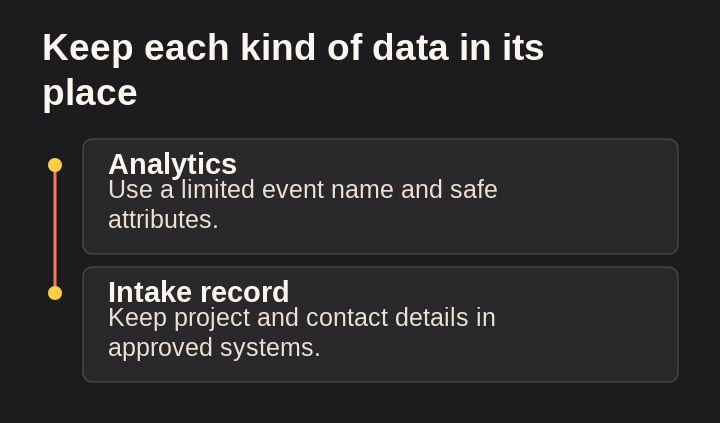
Analytics should describe behavior without receiving unnecessary customer information.
Do not send names, email addresses, phone numbers, full project addresses or free-text project descriptions as ordinary Google Analytics event parameters. Google's policies prohibit sending information it can recognize as personally identifiable information. Its guidance also warns about inadvertent collection through URLs, page titles and other fields. Google Analytics: avoiding personally identifiable information
Use neutral event names and safe categorical values. A service category or form identifier may be useful without copying the customer's message.
Inspect confirmation URLs. If a form places an email address or other personal information in the URL, analytics or other tools may receive it unintentionally.
Keep the detailed customer record in the appropriate business system with controlled access. Reporting can use aggregate counts or non-identifying internal references where properly designed.
Review consent and privacy requirements for the actual tools and jurisdiction. Do not assume that adding a privacy-policy link resolves every obligation.
Be especially careful with screenshots and exported reports. A table intended to show lead quality can accidentally expose customer contact details or private project information.
Use source labels consistently
Source tracking becomes easier when everyone uses the same categories.
Separate the technical source, such as a campaign or referring website, from the customer's answer to “How did you hear about us?” Both can be useful, and they may disagree.
A customer might receive a recommendation, search the company name and click an advertisement. The measurable last interaction does not necessarily explain the entire decision.
Keep campaign naming conventions readable. Use a stable pattern for channel, service and campaign purpose. Avoid names that only one person understands.
Do not overwrite an unknown source with a guess to make the report look complete. Track unknowns and investigate whether the gap comes from missing tags, phone calls without attribution or normal measurement limits.
Keep internal tests separate. A test inquiry should be recognizable so it does not enter the acquisition report, but avoid sending actual sensitive data during testing.
If multiple agencies or tools are involved, agree on naming and ownership before implementation. Duplicate tags and inconsistent labels can make later reconciliation harder.
Build a small event dictionary
An event dictionary is a short document explaining what each tracked event means. It does not need to be a technical manual.
For each event, record the trigger, expected frequency, exclusions, system owner and test method.
For example:
| Event label | Meaning | What it does not prove |
|---|---|---|
| Phone-link click | Visitor activated a phone link | Connected or qualified call |
| Form started | Visitor interacted with a form | Intent to finish |
| Form received | Submission was accepted by the designated system | Genuine or suitable project |
| Qualified inquiry | Team confirmed defined fit criteria | Won work |
| Appointment confirmed | Agreed appointment exists | Appointment attended |
| Job accepted | Business acceptance rule is met | Completed or collected revenue |
Use names that your reporting audience understands. Technical event identifiers can appear alongside them for the implementation team.
When an event definition changes, record the date. A report comparing periods before and after the change should not imply they are directly comparable without explanation.
Test with a realistic checklist
Testing should cover ordinary use and predictable failures.
Submit a valid form from a phone and a desktop. Try missing required fields, an invalid email format, an unsupported upload and a duplicate submission. Check whether information is preserved after an error.
Test the phone links and the actual routing. Confirm that the published number reaches the intended business and that after-hours behavior matches the website's description.
Check analytics, the saved record and the office notification. Verify that one successful test creates the expected number of events and records.
Test any consent choices that affect measurement. The website should remain usable when a visitor makes an available privacy choice, and reports should account for the resulting limitations.
Use synthetic test data rather than real customer details. Label it clearly so it can be excluded from business reporting.
Keep evidence of the test date and result. Recheck after changes to forms, themes, plugins, tags, integrations or phone routing. A test performed before a major update does not prove the current path works.
Reconcile reports without demanding impossible equality
Different systems can legitimately show different counts. They may use different dates, attribution models, filtering rules or definitions.
Begin by comparing like with like. Are you looking at event counts, unique users, calls, opportunities or customers? Are the date ranges and time zones aligned? Does one report include tests or duplicates?
Then examine the expected gaps. Analytics may miss some interactions because of consent or blockers. A call platform may include existing-customer calls. The customer system may combine several contacts into one opportunity.
Create a reconciliation note rather than forcing the numbers to match. For example: “Analytics recorded 18 form events. The form system stored 16 records. Two events were repeat confirmation views. Of the 16 records, three were spam and one duplicated an existing opportunity.”
That example is hypothetical, but the method is practical. It explains the difference and leaves a clear business count.
Investigate unexplained changes. A stable gap may reflect known methodology; a sudden gap may indicate a broken integration.
Calculate costs with honest denominators
Once the counts are reliable, calculate costs at the stages you care about.
Media cost per genuine inquiry equals advertising spend divided by genuine new inquiries. Media cost per qualified inquiry uses qualified inquiries. A broader customer acquisition cost may include management, creative and other costs, provided the definition is stated.
Consider a hypothetical campaign with $900 in media spend. It produces 30 recorded contact actions, 18 received inquiries, 12 genuine new opportunities and six qualified inquiries.
The corresponding media costs are $30 per contact action, $50 per received inquiry, $75 per genuine opportunity and $150 per qualified inquiry.
All four calculations can be arithmetically correct while answering different questions. Reporting only the cheapest-looking one can mislead the business.
Do not divide by zero or disguise an undefined metric. If there were no qualified inquiries, report that fact and the spend rather than inventing a cost figure.
Account for timing. A project may qualify or close after the period in which it first arrived. Use cohorts when the sales cycle makes same-period comparisons misleading.
Keep the dashboard connected to decisions
A useful dashboard should tell the team what to inspect next.
If phone clicks rise but connected calls do not, check the routing and metric definitions. If received forms rise but genuine inquiries do not, inspect spam and duplication. If genuine inquiries rise but qualification falls, review service fit, geography and expectations.
Do not assume the website is responsible for every change. Campaign targeting, seasonal demand, office staffing and service availability can all affect the path.
Show a small set of metrics with notes:
- Contact actions by path.
- Received inquiries.
- Genuine new opportunities.
- Qualified inquiries.
- Key exclusion reasons.
- Unknown-source share.
- Known measurement issues.
- Next action and owner.
The notes are important. A clean chart without context can conceal a form outage or a change in qualification rules.
Review examples as well as totals. A few anonymized records can help the team understand what a category means and identify inconsistent handling.
Give measurement an owner
Tracking is not a one-time installation. Someone needs to maintain the definitions, inspect failures and coordinate changes.
Assign technical ownership for tags and integrations, operational ownership for inquiry classification and business ownership for decisions. One person may hold several roles in a small company, but the responsibilities should still be explicit.
Decide who approves changes to key events. A campaign manager should not quietly redefine a conversion to improve a report, and an office process change should not remain invisible to the reporting team.
Keep access appropriate. People who need aggregate reports may not need customer records or call recordings. Review permissions when staff or vendors change.
Maintain a simple change log and test checklist. These are often more useful than a complex dashboard nobody can explain.
If a measurement issue is discovered, state the affected period and uncertainty. Fixing the problem is important; preserving an honest interpretation of past results is equally important.
A practical implementation sequence
Begin by inventorying contact paths and defining genuine and qualified inquiries. Then identify the system that confirms received forms and the process that classifies calls.
Next, test the existing implementation before adding new tools. You may find that the immediate issue is duplicate events, an old notification address or missing office dispositions.
Create the event dictionary and source labels. Make the smallest changes that let the business answer its priority questions.
Run a short reconciliation period with manual review. Compare technical events with actual records and document the differences.
Only then consider deeper integrations, such as importing qualified outcomes into an advertising platform. Reliable inputs and appropriate privacy controls matter more than a sophisticated connection.
This sequence is a recommendation for organizing the work, not a guarantee of a particular setup time or marketing result.
Use a short daily check when the system is new
During the first days after implementation, a brief operational check can reveal problems before they become a monthly reporting surprise. Compare the new records with the notifications the office received and ask whether any callers mentioned a failed form.
Look for obvious anomalies: identical messages, repeated test records, missing service fields or an unusual increase in contacts with no source. Treat these as prompts to investigate, not automatic proof of fraud or technical failure.
Check whether every genuine new inquiry has an owner. Measurement is incomplete as an operating tool if the record exists but nobody knows who should respond.
Keep the review proportionate. The purpose is to establish confidence in the path, not to make employees spend more time documenting an inquiry than helping the customer. Once the system is stable, use a cadence appropriate to volume and risk.
Record only meaningful exceptions. A short note such as “Two form notifications were delayed; records were present and assigned” gives useful context without creating a second database of customer details.
When the office and the report disagree, inspect the same examples together. That conversation often exposes a definition problem more quickly than another dashboard.
Questions to ask a tracking provider
Ask what the tool measures and what it cannot establish. Request a demonstration using a test inquiry rather than relying only on a sales presentation.
Clarify number ownership, data export, access, retention and what happens when the service ends. Understand whether recordings are optional and which consent responsibilities remain with the business.
Ask how duplicate events are prevented, how form failures are detected and how the tool handles embedded forms or scheduling systems.
Find out who maintains the implementation after website changes. A tracking setup can become unreliable when nobody owns the interaction between the site and the tool.
Ask for plain-language definitions in reports. “Conversions” should be explained in terms of actual triggers and exclusions.
Finally, ask how the provider distinguishes uncertainty from failure. A trustworthy report should be able to say that a source is unknown or that data is incomplete.
Frequently asked questions
Is a phone click a lead?
It is a contact-intent signal. It may become a call, but the click alone does not establish connection, fit or a new project. Label it separately from verified inquiries.
Should spam be deleted from reports?
Keep raw workload and cleaned business counts separate. Exclude spam from genuine-opportunity metrics, but retain enough aggregate information to detect a growing problem.
Do I need call recording to measure marketing?
Not necessarily. Call logs and consistent outcome classification may answer the immediate questions. Recording introduces additional privacy, consent and access considerations.
Why do analytics and the customer system disagree?
They may count different actions, use different dates or miss some activity. Reconcile definitions and known limitations before assuming one system is wrong.
Count what the business can explain
Reliable lead tracking is a shared agreement about what happened. The website records an action, the communication system confirms receipt and the team determines whether there is a suitable opportunity.
Keep those stages separate, test the path and label uncertainty honestly. The result is a report that supports better decisions rather than simply displaying larger numbers.
If your dashboard and office experience tell different stories, discuss the measurement path with Loskutech. Start with one form and one phone route, then follow the evidence all the way to a genuine inquiry.
Explore our marketing and acquisition services for the work and review process behind this approach.