
A contractor's service area is a business decision before it is a setting in an advertising account. It determines where crews travel, which estimates deserve a site visit, what the website promises and how much time the company spends between jobs.
Drawing a larger circle can create more potential inquiries. It can also create more driving, complicated scheduling and work that looks attractive until the full delivery cost is considered.
A useful contractor service area strategy connects marketing with the places you can serve reliably. This guide shows how to build that strategy using your own job records, a simple territory worksheet and a controlled expansion test. The examples are hypothetical. They explain the calculations without suggesting that one distance or margin target fits every trade.
Separate three different maps
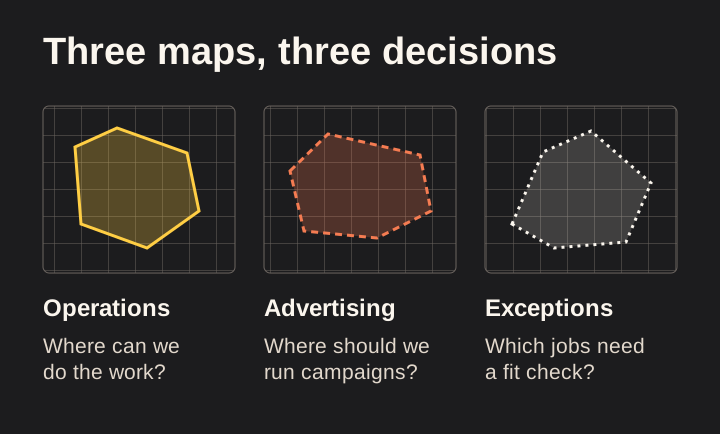
Most contractors have at least three versions of their service area, even when they have never drawn them.
The first is the operating area: places where the business can actually deliver its services under normal conditions. The second is the marketing area: places where it actively invests in attracting work. The third is the exception area: places it might serve when a project meets particular conditions.
These maps do not have to be identical. A company might accept a large commercial project farther away without advertising small repairs in the same town. A remodeler might market heavily in a few neighboring communities while considering referrals elsewhere.
Problems arise when those distinctions are invisible. The website says “serving the entire region,” the advertising targets a broad radius and the office quietly turns away distant requests. Each team is operating from a different promise.
Start by documenting the difference:
- Normal coverage: Services and locations the team routinely accepts.
- Active marketing: The combinations of service and location that receive focused investment.
- Conditional coverage: Work that requires an additional fit check before a visit is arranged.
- Outside coverage: Work the business does not currently undertake.
Describe conditional coverage in operational terms. A minimum project scope, a planned route day or a particular specialist's availability may matter. Avoid a vague rule that lets every employee improvise.
The purpose is consistency. A customer should receive the same basic answer whether they visit the website, call the office or speak to a crew member.
Start with completed work, not a list of nearby cities
Your completed jobs can reveal how geography affects your operation. Begin with records you already have permission to use, and keep personal customer information out of any public planning document.
For each job, collect the service category, general location, estimated and actual crew time, number of visits, direct project costs and outcome. Add travel time if it was recorded. If it was not, label any reconstruction as an estimate.
Do not assume that the biggest invoice represents the best location. A large project can require extra supervision, multiple deliveries and repeated return trips. A smaller nearby job might fit efficiently between existing appointments.
Keep comparable services together. Mixing emergency plumbing calls with major bathroom renovations can make a territory look inconsistent when the underlying issue is service mix.
Also record unsuccessful estimates where possible. A distant territory may look profitable if you review only won jobs while ignoring the time spent visiting projects that never proceeded.
Use a manageable sample that covers relevant business conditions. The right period depends on seasonality, sales cycle and record quality. One unusually busy month can be misleading. Several years of records may also conceal changes in staffing, service focus or costs.
Ask your operations team what the spreadsheet misses. They may know that certain areas involve parking restrictions, difficult access, unreliable delivery windows or predictable traffic delays. Record those as observations to verify, rather than silently converting them into precise cost assumptions.
Use travel time alongside distance

Straight-line distance is convenient, but a crew travels on roads. Two properties equally far from your base can require very different journeys.
Consider the time of day, normal departure point, supplier stops and whether the crew will return to the same area. A route from the workshop to a single estimate is different from a route between two nearby jobs.
Build your planning assumptions from realistic conditions. If most crews leave during busy traffic, a quiet Sunday driving estimate is not a useful operating baseline. When travel varies widely, record a range rather than a falsely precise average.
Think about total visits. A project may involve an initial inspection, measurements, production days, delivery coordination and a final check. A location that is acceptable for one visit may be costly across many visits.
A simple travel worksheet can include:
| Input | What to record |
|---|---|
| Normal starting point | Workshop, supplier or previous job |
| Typical one-way journey | A realistic time range |
| Number of expected trips | Include estimating and return visits |
| People traveling | Distinguish one estimator from a full crew |
| Vehicle costs | Use a consistent internal method |
| Access constraints | Parking, unloading, gates or scheduled access |
| Scheduling effect | What other work the trip prevents |
Avoid treating travel as purely a fuel expense. Time on the road also changes the number of appointments or production hours available. That trade-off should be visible even when you decide a distant project is worthwhile.
Build a simple contribution comparison
You do not need a complicated financial model to ask better territory questions. Start with revenue less the direct costs that change with the job, then examine acquisition and estimating costs separately.
Use consistent definitions with your bookkeeper or accountant. Businesses classify labor, vehicles and overhead differently. The worksheet should support decisions without pretending to replace financial reporting.
Consider this hypothetical comparison:
| Item | Nearby project | Distant project |
|---|---|---|
| Contract revenue | $8,000 | $9,000 |
| Direct materials and subcontractors | $3,200 | $3,600 |
| Direct production labor | $2,400 | $2,650 |
| Additional travel and site logistics | $150 | $600 |
| Contribution before marketing and overhead | $2,250 | $2,150 |
The distant job has a higher selling price but a lower contribution under these invented assumptions. That does not make distant work inherently bad. It shows which costs need to be visible.
Now add estimating effort and acquisition cost. If the distant territory requires more unconverted site visits, its average cost per won project may be higher than the individual job sheet suggests.
Check for double counting. If travel labor is already included in direct production labor, do not subtract it again in a separate travel line. Explain which line contains it.
A useful model is one your team can audit. Every number should have a source, an assumption label or a question mark. If the answer depends on a value you do not know, use a range and identify what information would narrow it.
Compare contribution per constrained resource
Total contribution matters, but it is not the only planning lens. When a particular resource is scarce, consider how much of that resource each type of work consumes.
If your estimator is the bottleneck, compare estimating time per won project. If your only specialist crew is booked, examine contribution per crew day. If the business has limited vehicles, consider the effects of long travel routes and repeated deliveries.
These comparisons should guide discussion, not produce automatic decisions. A strategic project may have learning value, a relationship benefit or follow-on work that is not captured in a simple ratio. Keep those reasons explicit and separate from measured profitability.
For example, a fictional contractor may accept a lower-contribution project in a new area to understand its logistics. That is a test with a cost, not evidence that the area is already profitable. Define what the test must teach and how much uncertainty the business can afford.
Avoid valuing hypothetical future work as though it were contracted. A prospect saying they may have more projects later is useful context, but it does not erase the costs of the first project.
The practical question is: “Given our current constraints, what work can we deliver well while leaving enough capacity for the rest of the business?” That question is more useful than asking which town has the highest average invoice.
Create core, conditional and test areas
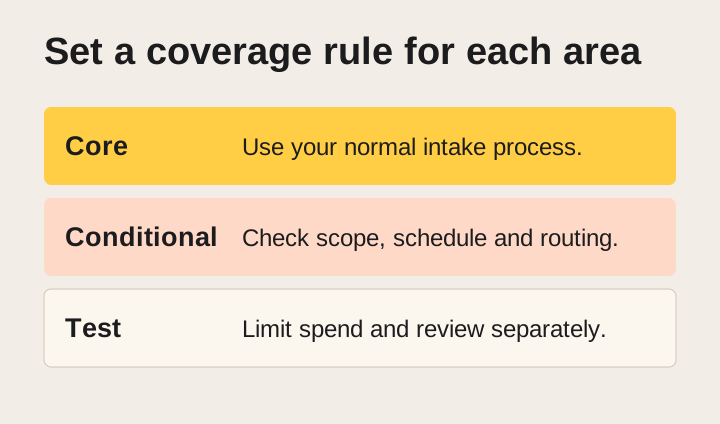
Turn the analysis into a simple operating decision. Three categories are often enough.
Your core area contains service-location combinations that the business can support routinely. Marketing can focus here, and the office can generally follow its normal intake process.
Your conditional area contains places where suitability depends on project scope, timing or routing. The office should explain the condition before arranging a site visit.
Your test area contains places where the opportunity looks plausible but evidence is limited. Marketing investment should be bounded, and the results should be reviewed separately.
You may also need an explicit outside-coverage list. This is helpful when nearby place names are easily confused or a broad regional label includes locations you cannot serve.
Do not assign categories solely by neighborhood wealth or assumptions about residents. Base territory decisions on service capability, logistics, project fit and evidence from the business. A location is a practical operating variable, not a reliable description of an individual customer's needs.
Write rules in plain language. “We assess larger scheduled projects in Area B before arranging an in-person estimate” is clearer than “Tier-two territory subject to qualification.”
Give someone responsibility for maintaining the rules. A territory map becomes stale when crews relocate, a supplier changes or a new service is introduced. The person answering inquiries needs access to the current version.
Make Google Business Profile reflect reality
Google Business Profile has its own service-area rules, which are different from your internal profitability model.
Google's current guidance allows eligible service-area businesses to specify up to 20 service areas using cities, postal codes or other supported areas. It says the overall boundary should generally be within about two hours of driving time from the business base and that the area cannot be entered as a radius. Businesses that do not serve customers at their address should remove the public address and enter their service area instead. Check the current guidance for your business type before editing. Google: manage service areas
These are platform guidelines, not recommendations that every contractor should drive two hours. Your economically sensible operating area may be much smaller.
Likewise, adding every possible area does not create a branch in each one. Do not describe an unstaffed location as an office or invent an address to support expansion. Google's representation rules distinguish real eligible locations from arrangements that do not qualify. Google: business representation guidelines
Keep profile information aligned with actual service delivery. If a location is only considered for a narrow service category, make the website's explanation clear enough to prevent a broad promise.
Review your profile after changes, but do not assume an edit will be approved or appear immediately. Record what was changed and verify the visible result. The marketing team should distinguish a submitted update from a confirmed public listing.
Understand what advertising location settings can and cannot do
Advertising geography is another separate system. Google Ads can use physical-location and location-interest signals. Its documentation explains that the default advanced option can include people in, regularly in or interested in the targeted area. It also states that location accuracy is not guaranteed. Google Ads: geographic targeting
For a local contractor, that distinction matters. A property owner may be outside the area while arranging work on a local building. Another person may be physically nearby but need work somewhere you do not serve.
Do not choose a setting without considering your customer path. Presence-focused targeting may fit a campaign intended for people physically in the service area. Broader interest targeting may capture legitimate remote owners, but it needs careful qualification and review.
Check the available controls for the actual campaign type. Do not assume every campaign exposes identical options or behaves the same way. Review current platform documentation and the live account before making changes.
Most importantly, qualify the project address. The searcher's location is an advertising signal; the property's location is an operational fact you need from the inquiry.
Maintain an exclusion list where appropriate, but inspect results rather than treating settings as a perfect fence. If out-of-area inquiries persist, examine targeting, search terms, landing-page wording and the information people submit.
Build service-area pages around real questions
A location page should help a customer decide whether your business is appropriate for their project. Changing the city name in otherwise identical copy does little to help that decision.
Useful content can explain the services actually available, how estimates are arranged, relevant project examples and any location-specific operational details you can substantiate. Do not invent local experience to make a page seem established.
A contractor that has completed approved projects in an area can explain what was done and what made the work distinctive. If no such example exists, use accurate service and process information without pretending there is a local portfolio.
Consider whether a single service-area overview answers the question better than many separate pages. A small company with similar coverage and limited distinct material may have little reason to create a page for every nearby place.
Google's spam policies identify doorway abuse, including pages created to rank for similar queries that funnel users toward the same destination without useful differentiation. Avoid treating a long list of city pages as an automatic local SEO strategy. Google Search: spam policies
For every proposed page, ask: “What can a customer learn here that is relevant to this location and not already answered better elsewhere?” If the only answer is the place name, reconsider the page.
Write coverage language that prevents confusion
Your website should make the general coverage boundary easy to understand without forcing visitors to interpret an intricate map.
Use recognizable places and clear qualifications. Explain which services are routinely available and how customers can check an edge case. Avoid broad phrases such as “anywhere in the metro area” if the office applies substantial exceptions.
A fictional example might read:
“We provide scheduled exterior painting in the communities listed below. For properties outside this area, send the project location and a short description before requesting a site visit. We will confirm whether the project fits our current schedule.”
This is an example of structure, not copy every contractor should adopt. The actual wording must reflect your services and response process.
Keep fees and minimums accurate. If a travel fee or minimum project requirement applies, disclose it at the appropriate stage before a customer incurs a commitment. Do not publish a number that the office has not approved or that changes informally by caller.
Include a project-location field in the inquiry form. A city or postal code may be enough for initial routing; a full address may be needed later. Collect only what serves the next step and explain why additional detail is requested.
Make error messages helpful. If an automated form rejects a location, provide a contact path for genuine boundary cases rather than trapping the user in a loop.
Give the office a consistent decision tree
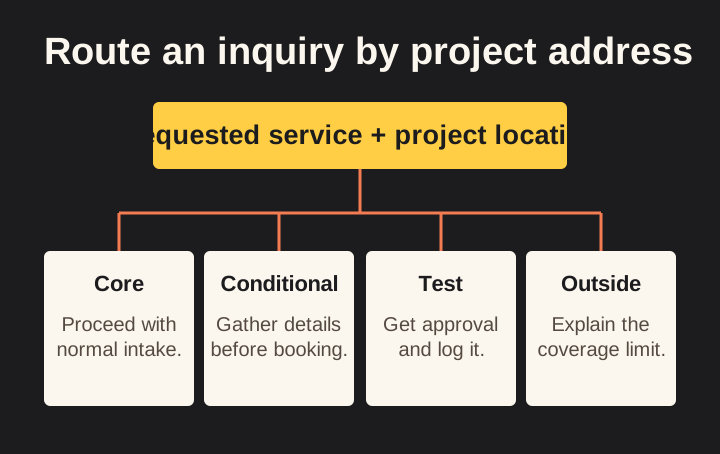
A territory strategy has little value if only the marketing person understands it. Build a short intake guide the office can use during a real conversation.
Start with the requested service and project location. If both fall within core coverage, continue the normal process. If either is conditional, gather the specific information needed for a decision before promising a visit.
For a test area, explain who approves the next step. That person should consider project scope, route timing and current capacity. Record the decision so future inquiries do not require the same discussion from scratch.
For work outside coverage, respond politely and clearly. Do not imply the customer is a poor prospect merely because your business is not positioned to serve them.
If you refer the customer to another company, obtain permission before sharing their contact details. You can also provide a public business contact and let the customer decide whether to reach out. Any referral relationship should be represented honestly.
Keep a small set of reason codes:
- Outside normal service area.
- Service unavailable in that location.
- Schedule incompatible.
- Project scope outside current fit.
- Conditional approval pending.
- Customer chose not to proceed.
Those distinctions help marketing separate a territory problem from a service or scheduling problem. A generic “lost” label hides the information you need.
Test expansion without changing the whole business at once
Expanding into a new area should answer a defined question. “Can we attract suitable projects here and deliver them within our operating constraints?” is more useful than “Can we get clicks in another city?”
Choose one service and one bounded area. Identify the reason for the test, such as existing referrals, practical routing or a service gap you can credibly address.
Set limits before launching. Decide the maximum marketing spend, estimating time and operational disruption you are prepared to accept. These are management choices based on your circumstances, not industry benchmarks.
Create a separate way to identify inquiries from the test. You may use campaign labels, a form field or a consistent internal tag. Keep customer information secure and avoid collecting unnecessary data.
Define what counts as useful evidence. Relevant inquiries, qualified conversations, estimate effort, proposals, won projects and delivery experience each tell you something different.
Also define stopping conditions. Repeated requests for unavailable services, unmanageable travel or a failure to respond reliably may justify pausing before the budget is exhausted.
Avoid expanding simply because the first inquiry looks promising. A small sample can be useful for learning while remaining insufficient for a confident profitability conclusion. Continue, revise or stop based on the whole picture, including uncertainty.
Build a territory scorecard that does not overpromise
A concise scorecard can help compare areas without hiding judgment behind a single score.
| Dimension | Evidence to collect | Decision it informs |
|---|---|---|
| Service fit | Actual requests and accepted scopes | Which offers belong in the area |
| Travel and logistics | Visits, route times and access notes | Delivery feasibility |
| Estimating effort | Hours and visits per won project | Sales capacity |
| Contribution | Revenue and consistently classified direct costs | Economic suitability |
| Acquisition | Spend and genuine qualified inquiries | Marketing efficiency |
| Reliability | Rescheduling, response gaps and return trips | Customer experience |
| Confidence | Sample size, missing data and unusual jobs | How strongly to act |
Do not collapse every dimension into a precise-looking total unless the weighting is genuinely useful and understood. A high score can conceal a non-negotiable constraint, such as lacking the required capability for a service.
Keep a notes column for exceptions. A single difficult access condition should not automatically condemn a whole area, but it may explain a project outlier.
Review change over time. An area that was difficult before you had a second crew may become practical. An area that was efficient can become less attractive if your normal starting point changes.
A good scorecard makes the next decision clearer. If it merely produces a colorful ranking without changing what the team does, simplify it.
Handle seasonality and uncertain demand
Territory performance can change with the season, weather, customer planning cycles and your own schedule. Avoid treating one period as a permanent description of an area.
Compare similar conditions when possible. If one territory was marketed during a peak service season and another during a quiet period, the difference may not come from geography.
Record changes in price, offer and team capacity alongside the data. Otherwise, a territory may receive credit or blame for something that changed across the business.
When demand is uncertain, preserve flexibility. A conditional service area can let you assess suitable projects without making a broad promise. A limited campaign can collect evidence without committing to a permanent expansion.
Do not let a desire to keep crews busy justify work the business cannot deliver responsibly. Marketing should support a workable schedule, not conceal operational constraints.
The same caution applies when the schedule is full. Turning off all activity without considering the sales cycle can create a later gap. Plan ahead using your own lead-to-start timing, while keeping current availability honest.
Protect customer privacy when mapping jobs
A map can be useful internally and inappropriate publicly. Exact residential addresses, customer names and project details can expose information that is unnecessary for a marketing explanation.
For internal planning, limit access to people who need the data. Use the least detail required for the decision, and follow the company's retention and security practices.
For public visuals, use generalized areas or synthetic examples unless customers have explicitly approved the disclosure. A marker placed on an actual home can reveal more than the accompanying caption suggests.
Remove personal details from screenshots. Check map labels, browser tabs and exported filenames as well as the visible table. An anonymized row is not anonymous if another part of the image reveals the customer.
A conceptual territory diagram can explain the strategy without showing any real project locations. Label it as illustrative so readers do not mistake it for the agency's operating footprint or a client's results.
Put the strategy into a one-page operating brief
Bring the decisions together in a document the team can actually use.
List the date of the review, the owner and the services covered. Define core, conditional, test and excluded areas. Explain the conditions for exceptions and who can approve them.
Add the customer-facing coverage language and the intake questions. Link the advertising and profile settings that need to stay aligned, but do not copy every technical detail into the brief.
Include the next review trigger. That might be a capacity change, completion of the expansion test or a recurring business review. The trigger should reflect how quickly the underlying conditions change.
Finally, list unresolved questions. Missing travel data, uncertain estimating time and unverified page claims should remain visible. A useful plan can contain uncertainty as long as people know where it is.
Frequently asked questions
How large should a contractor's service area be?
Use service requirements, travel, repeated visits, project economics and capacity to decide. There is no universal profitable radius. Platform limits and guidelines do not determine the right operating boundary for your business.
Should every town have its own website page?
Only when the page provides a useful, accurate answer for that audience. A service-area overview may be better than many repetitive pages. Avoid inventing local offices, project experience or location-specific facts.
Why do ads generate inquiries from outside the target area?
Location targeting uses imperfect signals, and some settings include interest in an area rather than only physical presence. The person searching may also own a property elsewhere. Check the project address and review actual campaign settings and results.
Is a distant project always less profitable?
No. Scope, pricing, scheduling and logistics all matter. Compare the full delivery and acquisition effort, and distinguish measured results from assumptions about future work.
Make the next territory decision with evidence
A useful service-area strategy makes the business easier to market and easier to run. Customers understand where you work. The office knows which requests fit. Marketing can focus on places that operations can support.
Start with completed jobs, make travel and estimating effort visible, and test expansion in a controlled way. Keep the map honest as the business changes.
If your website, advertising and intake process describe different service areas, that is a practical place to start. Tell Loskutech about your business to discuss how to bring those parts of the customer path into agreement.
Explore our marketing and acquisition services for the work and review process behind this approach.